I did it. I put Windows 7's RC on my main computer (my Dell Vostro laptop). I'm not sure why I did. I had to reformat anyway, to get a lot of the extra crap I'd had to install for the last 2 semesters of school, but I took a gamble.
And I'm loving it.
Sure, W7 isn't complete yet, and I'm sure I'll encounter bugs, but I haven't yet. For those that don't know, the RC (Release Candidate) is a version of a program that is nearly ready for release but may still have a few bugs; essentially the status between beta version and release version.
I blogged about the beta, and was happy with it, but it wasn't my main machine. This is. And now I'm using it every day, I'm finding some things that are frustrating, but nothing huge. And there are some really useful features, such as built-in ISO burning. Yeah I know, who burns an ISO nowadays? I've had to a few times, and it's nice. I just wish it had built-in ISO mounting as well (which it doesn't) and that Daemon would release a W7-supported version. But I digress.
For those that are on the fence, I say try it. I've enjoyed it.
Showing posts with label reviews. Show all posts
Showing posts with label reviews. Show all posts
Tuesday, May 12, 2009


Wednesday, January 21, 2009
Review: Windows 7 Beta pt 2
There was so much cool new stuff in Windows 7, I decided to make a second post. This is more of a "Here's where you can go for more info" kind of post, and I'll update it as I find better links, but a good one is here, at the How To Geek's site.
In addition, here's the information from Microsoft's help site on getting to know Windows 7:


In addition, here's the information from Microsoft's help site on getting to know Windows 7:


Review: Windows 7 Beta pt 1
As soon as it was announced that Windows 7 beta would be available for a limited time, I knew I had to grab it. I did, and threw it on an older laptop I had. The laptop doesn't meet the requirements (it's only a 1.7 Mhz proc, 768mb of RAM, and a 32MB video card), but I wasn't about to throw it onto a live machine and have it die. It is a beta, after all.
This isn't going to be a review of under the hood features. This is more of a review of the shiny chrome additions, like the new rear-view mirror, or the new stereo.
So, where to begin? The desktop, of course.

Obviously, there are a couple of things that jump out right away. It's based on the look of Vista, but with changes. The icons are bigger, and the taskbar is bigger, which is nice. Also, you can pin icons on the taskbar easily. Another nice thing is that sticky notes are built in. You can see a couple there on my desktop.
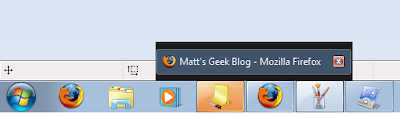
The next change I love is the ability to close items straight from their taskbar icons.

You also have the ability to customize your taskbar with simplicity. I know you could customize it before, but not as simply.
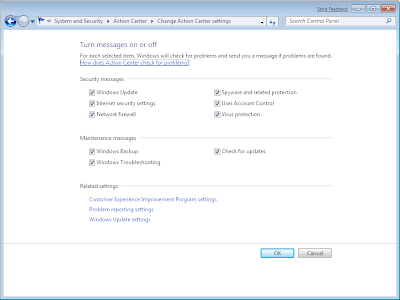
And you see that flag? That's the new action center, a way to control which messages Win7 sends you. Don't want to see backup information? Okay, turn it off.
UAC has gone through an overhaul as well (let all users of Vista rejoice!), allowing the user specifically how tight to control their machine:
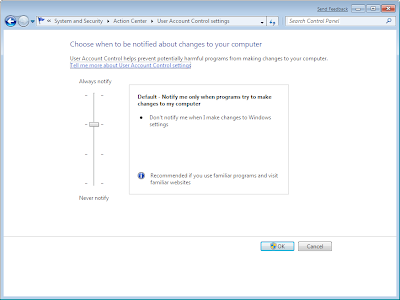
All I can say about that is that it's about time.
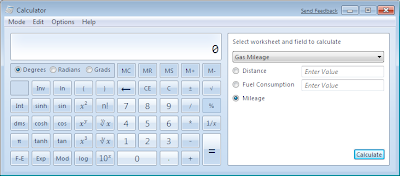
The calculator has been overhauled as well, allowing built-in conversion tools, a programming calculator (with binary, qword, dword, and other tools), and lots of other changes.

And the speed? Even on this 'slow' machine, it's nice and peppy. I can only imagine what it would do on my beefy machine with a dedicated video card, an AMD x2 proc, and 6GB of RAM.
My favorite change though is the auto-fill and auto-split. If you drag a window to the left, it will auto-fill only the left side. Same with the right side. If you drag it to the top it will fill the whole screen. That's awesome, especially for people with large monitors, like myself.
So, my decision? I will be upgrading. I like Windows 7. It took some major work to get a WEP2 driver on this laptop, but it's a beta, so I'll cut it some slack. Other than that, I have 0 complaints.
For a beta, it's stable. It's almost cliche at this point, but Windows 7 is everything Vista should've been, and more.
This isn't going to be a review of under the hood features. This is more of a review of the shiny chrome additions, like the new rear-view mirror, or the new stereo.
So, where to begin? The desktop, of course.

Obviously, there are a couple of things that jump out right away. It's based on the look of Vista, but with changes. The icons are bigger, and the taskbar is bigger, which is nice. Also, you can pin icons on the taskbar easily. Another nice thing is that sticky notes are built in. You can see a couple there on my desktop.

The next change I love is the ability to close items straight from their taskbar icons.

You also have the ability to customize your taskbar with simplicity. I know you could customize it before, but not as simply.
And you see that flag? That's the new action center, a way to control which messages Win7 sends you. Don't want to see backup information? Okay, turn it off.

UAC has gone through an overhaul as well (let all users of Vista rejoice!), allowing the user specifically how tight to control their machine:

All I can say about that is that it's about time.

The calculator has been overhauled as well, allowing built-in conversion tools, a programming calculator (with binary, qword, dword, and other tools), and lots of other changes.
And the speed? Even on this 'slow' machine, it's nice and peppy. I can only imagine what it would do on my beefy machine with a dedicated video card, an AMD x2 proc, and 6GB of RAM.
My favorite change though is the auto-fill and auto-split. If you drag a window to the left, it will auto-fill only the left side. Same with the right side. If you drag it to the top it will fill the whole screen. That's awesome, especially for people with large monitors, like myself.
So, my decision? I will be upgrading. I like Windows 7. It took some major work to get a WEP2 driver on this laptop, but it's a beta, so I'll cut it some slack. Other than that, I have 0 complaints.
For a beta, it's stable. It's almost cliche at this point, but Windows 7 is everything Vista should've been, and more.
Sunday, January 18, 2009
Review: Garmin Nuvi 750

Early last year, my wife and I decided to join the throngs of the lost, and purchased a GPS unit. I found a great deal online and purchased a Navigon 2100, a little 3.5" unit with a clumsy windshield mount and terrible GPS speed. But, I got a good deal, and when we went to Denver for 2 months for an IT internship, it saved our lives.
The last little while though, I'd been selling some old crap on eBay and decided to take the splurge and purchase a better GPS. I was able to grab a Nuvi 750 from Best Buy's eBay outlet for $100, and was a little unsure of what I would find.
The Good:
Where to start? There's a reason Garmin is one of the industry leaders in GPS technology.
First and foremost, the response time to commands is AMAZING. Granted, coming from the Navigon to the Garmin is like moving from a Geo Metro to a Corvette, of course it's going to be faster, but either way, I'm sufficiently impressed by how quick it performs.
It also finds a satellite extremely efficiently. This was my biggest gripe with the Navigon. There were times we'd be driving for 5-10 minutes before it would get sufficient reception. Driving in the same locations, the Nuvi connects on average within 1-2 minutes, most times less.
Intuition. The designers of the Nuvi software were really smart. Even the little things it does are great. Take a few examples: You start your car, the GPS is plugged in. It recognizes that and will boot the GPS for you. You start driving, but haven't touched the GPS yet, it will automatically switch to the map, showing you where you are. As you drive, it will show the next cross street, even if you aren't having it navigate. When you turn the car off, it will give you 30 seconds, after which it will automatically shut down. All of these little things make it a no-hassle, think for you approach.
Map updates. The moment I got my Nuvi, I registered it with Garmin. Imagine my surprise when I found it qualified for a free upgrade to the 2009 maps. Most places charge an arm and a leg for a map update, but Garmin handed it out. Granted, I'm sure the next ones will charge, but it was a pleasant surprise.
The mount. It's nice, it's simple, it works. Getting the unit on and off the mount is a snap. Can't say the same for the Navigon.
The Bad:
These aren't so much bad things, more just picky things. First, the rerouting capabilites are slower than the Navigon. This isn't such a big deal, but it's interesting.
The amount of data on the screen is lacking. Now I know you're not supposed to watch the screen of the GPS all that much, but on my Navigon I could get worlds of awesome data on the screen all at once while navigating: est arrival time, current speed, miles left (total), altitude, traffic, etc. The Nuvi offers most of this, but it requires going to separate screens, something I just can't do while driving.
Overall:
I like it. A lot. It was well worth the upgrade. It's lighter, faster, bigger (4.3" vs 3.5"), etc etc. I'm a happy Nuvi-er as of 2 weeks ago.
Wednesday, December 31, 2008
Review: Sprint Mogul vs Sprint Touch
 Over the summer, we switched to Sprint and got new phones and I played with the Palm Centro and the HTC Touch. I decided on the Touch for a number of reasons, the main one being that it was Windows Mobile (read very customizable and hackable). As used it and got more comfortable with it, I quickly realized I needed one more thing - a real keyboard. I just couldn't get used to the software keyboard, and despite promises from other Touch users that I'd soon be as good with it as with a real keyboard, it wasn't happening. So I looked for alternatives.
Since I wasn't anywhere close to qualifying for an upgrade, the new Touch phones (the Touch Pro and the Touch Diamond) were out of my price range, so I was left looking for one of the older models or a steal of a price. Of course I could look at BlackBerry's, but the specialty plan I'm on with Sprint doesn't support the BB data, so those were out.

Here's the spec comparison between the two phones (not sure why the HTML is placing so much space between this and the table):
| Sprint Mogul (PPC-6800) | Sprint Touch (PPC-6900) | |
| Installed RAM | 64MB SDRAM | 128MB SDRAM |
| Installed ROM | 256MB Flash | 256MB Flash |
| Processor | QUALCOMM 400 MHz MSM7500 | Texas Instruments 201 MHz OMAP850 |
| Display type | 2.8" TFT active matrix | 2.8" TFT active matrix |
| Max Resolution | 240 x 320 | 240 x 320 |
| Data Speed | EV-DO Rev. A | EV-DO Rev. A |
| Dimensions | 2.3 in x 0.7 in x 4.3 in | 2.4 in x 0.6 in x 4 in |
So the Mogul has less RAM but a faster processor, and about everything else is the same.
To make things better, I have a friend that runs a cell phone shop who had a like-new Mogul on hand that he gave me a steal on - and I picked it up.
So, after a week of playing with it, here's my review:
The Good:
The keyboard is awesome. Look you can talk all you want about how you'll get used to using a software keyboard, blah blah blah, but I couldn't. And after 4 months of playing with it, I'd had enough.
It's also WM6.1 (like the Touch), so the learning curve from the Touch to the Mogul was nil.
It's got Wi-Fi. Yeah, it's cool. In addition, its got a switch on the side so it doesn't kill your battery if you're not using it.
It's got a scroll wheel on the side. That makes it a lot easier to scroll websites and email and such.
The Bad:
It is a little slower than my Touch, which I'm sure is because the RAM is less.
The touch screen is slightly (about 1/8") depressed from the housing, which makes it hard to get to the X in the top right corner or any of the other functions on the edge (like scrolling).
No TouchFLO (I can add it as an app from xda-developers) so no easy access to the 9 most used contacts like the Touch. I'm sure I'll be adding this soon.
It seems to be thicker, although not by much, it is.
The housing is hard plastic, not rubberized plastic, which means it's slippery (yeah, I've dropped it already once).
The GPS is slower to connect than the one in my Touch.
Overall:
I like it. The keyboard alone makes it more than worth the upgrade. Well, that and including the fact that I got taken care of by my friend.
That said, anyone that needs or is interested in a cell phone in the Salt Lake Valley, be sure to stop by the Wireless Giant store at 7200 S State St in Midvale and talk to Pieter. Tell him I sent you and he'll take care of you as well. No, I don't get anything from referring you, but I just like to make sure people that take care of me get rewarded.
Other reviews can be found here:
Subscribe to:
Posts (Atom)